

7 Checks to Pick the Right 3D Printed Phone Stand
Quick Summary
To choose the right 3d printed phone stand, first match it to your phone size and case thickness, then pick a viewing angle for your main use. Check that the base is wide enough to resist tipping, and confirm the stand leaves room for your charging cable.
- Measure your phone's width and depth with its case on before comparing designs.
- Use a shallow 15 to 30 degree tilt for reading and typing, and 45 to 60 degrees for video calls.
- The base should be at least as wide as your phone is tall in your chosen orientation.
- Press the top corner of the screen gently to test whether the stand lifts or slides.
- Position your phone and cable together to confirm the charging port stays accessible.
Table of Contents
- Why a 3D Printed Phone Stand Beats a Generic Holder
- Match the Stand to Your Phone Size and Case Thickness
- Choose the Viewing Angle You Actually Need
- Look for Stability That Holds Under Real Use
- Pick a Model Built for Durable 3D Printed Desk Accessories
- Get a 3D Printed Phone Stand with Charger Access
- Order Your Custom 3D Printed Phone Holder Today
- Frequently Asked Questions
Why a 3D Printed Phone Stand Beats a Generic Holder
Last Updated: November 4, 2026
Choosing the right 3D printed phone stand takes less effort than most shoppers expect, and the payoff is a holder that fits your phone, your desk and your viewing habits. At Snaply3D, we've built our collection around that idea, and this guide walks you through the key checks to run before buying any stand.
Generic plastic holders often wobble, pinch a thick case or sit at a single angle that never suits your work. A 3D printed stand, made to a specific design, lets you choose the fit, the height and the look before it ships to you. It's a personal accessory, not a one-size-fits-all clip.
The Heart Phone Stand from Snaply3D, at $11.99, is a strong starting point for desk use. Its heart-shaped curve holds most smartphones upright in portrait position, so video calls, recipes and videos stay easy to see while you work.

Match the Stand to Your Phone Size and Case Thickness
Check your phone's dimensions and case thickness before you compare designs. A stand that grips a bare phone may not clear a rugged case, and a case that adds bulk can push the phone out of its cradle.
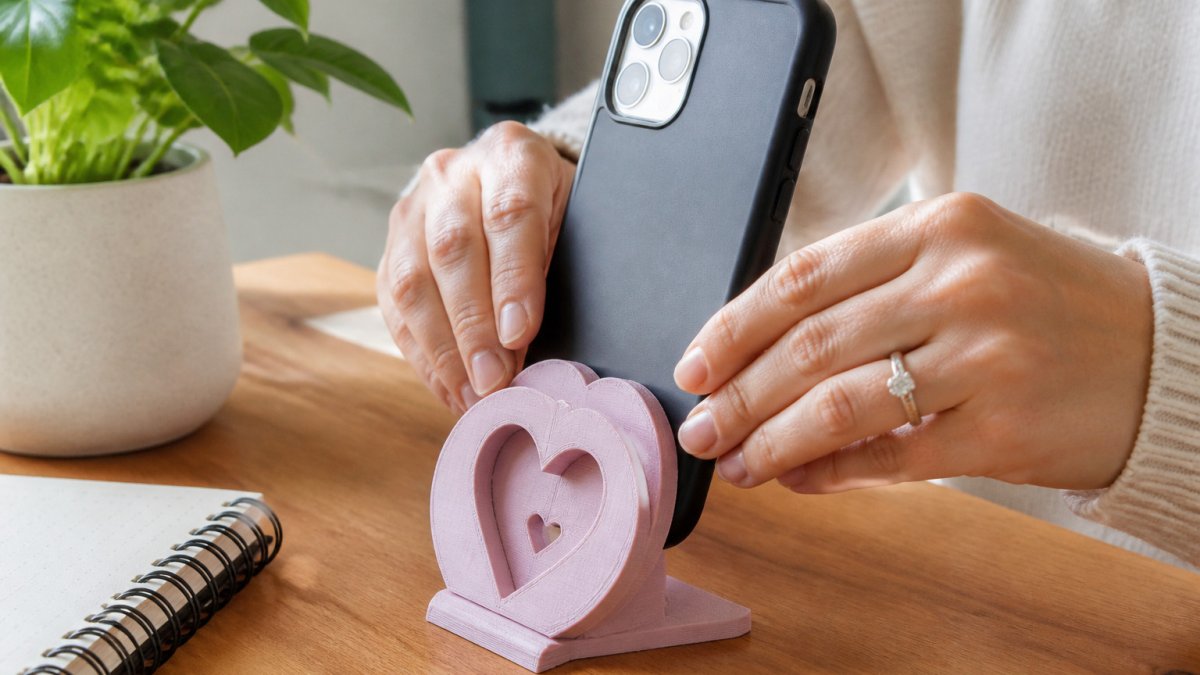
Measure the width and depth of your phone with its case on. Then compare those numbers against the stand's listed fit. Snaply3D's Heart Phone Stand holds most smartphones in portrait position.
For pocket-sized needs, the Pocket Phone Stand Keychain works as a foldable stand that also clips to your keys. It's compact at 2 3/4 x 1 3/8 x 3/8 inches and costs $6.99 per pack, with 1-, 3- and 5-pack options available. Phone not included.

!Hands placing a smartphone in a case onto a heart-shaped 3D printed desk stand
Choose the Viewing Angle You Actually Need
The right angle depends on what you do with your phone, and the difference between a comfortable setup and a cramped one usually comes down to a few degrees. A shallow tilt of roughly 15 to 30 degrees from vertical suits reading, scrolling and typing, because your wrist stays relaxed and the screen faces you squarely. A steeper lean of roughly 45 to 60 degrees works better for video calls, watching clips and following recipes, because the screen points more toward your face instead of your chest.
Think through your three most common uses, then pick the stand that handles them. The Heart Phone Stand is designed for desks, nightstands and offices. The foldable keychain stand is a compact option for use away from home.
Portrait versus landscape matters just as much as tilt. Portrait is the natural choice for scrolling, messaging and one-handed reading, while landscape gives you a wider view for video, games and side-by-side apps. Before you buy, decide which orientation you will use most and confirm the stand's cradle holds your phone securely that way.
Desk height changes the math. If your phone sits low on a desk while you sit in a chair, you will look down and strain your neck, so a taller stand or a steeper angle helps. If the phone sits at eye level, a gentler tilt keeps the screen readable without glare. For video calls, position the stand so the camera sits near your eye line rather than looking up at your ceiling.
Test the angle with your own phone before you commit. Place the phone in the stand, sit where you normally work, and check whether the screen sits too low or tips forward. If it does, the design is not right for your habits, and a different angle will serve you better.
Watch out: a stand that only supports one fixed angle can leave you tilting your head or hunching your shoulders all day, so choose a design whose angle matches how you actually sit.
Look for Stability That Holds Under Real Use
A stand only helps if it stays put, and stability is something you can judge before you buy rather than discover after your phone tips over. The key factors are base footprint, center of gravity, phone weight and stand geometry, and each one is easy to reason about with your own device in hand.
Start with the base footprint. A wider, deeper base spreads the load and resists tipping better than a narrow pedestal, especially when you tap or swipe the screen. As a rule of thumb, the base should be at least as wide as your phone is tall in the orientation you plan to use, so the stand does not become top-heavy. Small travel stands need more care here, because a light phone on a narrow stand can tip when you tap it.
Pocket Phone Stand Keychain – Foldable 3D Printed Holder →
Center of gravity is the next check. The lower the phone sits in the cradle and the more mass the base carries, the more stable the setup. A design that holds the phone high on a thin stalk looks sleek but shifts the center of gravity upward, which makes a screen tap feel like a wobble. Look for a stand that seats the phone low and keeps the base planted.
Phone weight matters too. A large phone with a rugged case can weigh noticeably more than a bare handset, and that extra mass magnifies any instability. If you use a heavy case, favor a stand with a broader base and a deeper cradle rather than a minimalist clip.
You can reproduce a simple tipping test at home. Place the stand on a flat desk, seat your phone, then press gently on the top corner of the screen the way you would when tapping an app. If the base lifts or the stand slides, it is not stable enough for daily use. Repeat the test in landscape, since the wider profile changes where the weight sits.
Stability also depends on the print itself. 3D printed plastic can show visible layer lines, which is a normal part of the process and makes each piece unique.
Handle the stand before you place your phone on it. Check that it sits flat on your desk, that the feet do not rock, and that the phone sits squarely in the cradle. A stand that passes these checks will hold up under real, everyday use.
Before you buy, run these stability checks with your own phone in hand.
| Check | What to look for | Why it matters |
|---|---|---|
| Base footprint | Base at least as wide as your phone is tall | Spreads load and resists tipping |
| Center of gravity | Phone seated low in the cradle | Keeps taps from causing wobble |
| Phone weight | Broader base for heavy cases | Extra mass magnifies instability |
| Tipping test | Press top corner of screen gently | Shows if the base lifts or slides |
| Surface check | Feet do not rock on the desk | Confirms a flat, steady setup |
Pick a Model Built for Durable 3D Printed Desk Accessories
Durability matters most for items you use every day. Choose a design that is simple, well-proportioned and printed with care, since thin, fragile details are the most likely to fail over time.
The Heart Phone Stand is lightweight and easy to move. The Heart Phone Stand comes in Rainbow Gradient, Red, Gold, Bronze and Black, so it can match a workspace as well as hold your phone. Each piece may show slight natural color variations.
Get a 3D Printed Phone Stand with Charger Access
If you charge while you work, check that the stand leaves room for your cable and port. A stand that blocks the charging port or forces a sharp cable bend will frustrate you quickly.
Position your phone and cable together before you buy, so the setup works the way you plan to use it.
Order Your Custom 3D Printed Phone Holder Today
You now have the seven checks: fit, case thickness, viewing angle, stability, durable design, charger access and finish. Work through them with your phone in hand, then choose the Snaply3D stand that suits your desk.
Shop the Heart Phone Stand for a stylish desk holder at $11.99, or pick up the Pocket Phone Stand Keychain at $6.99 for a portable option. Subscribe to our emails to hear about new designs and restocks.
Frequently Asked Questions
What is the best 3D printed phone stand?
The best option depends on how you use your phone. For desk viewing and video calls, a stand that holds the phone upright in portrait position works well. The Heart Phone Stand from Snaply3D is priced at $11.99 and is lightweight, decorative and available in Rainbow Gradient, Red, Gold, Bronze and Black. For carrying a stand with you, the Pocket Phone Stand Keychain at $6.99 is a foldable stand with a built-in keychain attachment and is available in 1-pack, 3-pack and 5-pack options. Choose based on where the stand will live.
Are 3D printed phone stands compatible with all smartphone models?
Most smartphones fit a well-sized 3D printed stand, but fit depends on your phone's width, thickness and case. The Heart Phone Stand holds most smartphones in portrait position. Measure your phone with its case on before you order, and compare that width and thickness against the stand's listed dimensions. Phone is not included with either product, so you supply your own device.
How do I ensure my phone stand provides adequate stability?
Stability comes from a wide base, a grip that holds the phone firmly and a design that keeps the center of weight over the base. Place the stand on a flat surface and test it with your phone and case in place before relying on it for video calls. Place the stand on a flat surface to check it before relying on it.
Do 3D printed phone stands have visible layer lines?
Yes. Because each piece is 3D printed, small layer lines may be visible. These are a normal part of the printing process. Each piece may also show slight natural color variation.
