

Why Articulated Joints Break Easily: Fix It Now
Table of Contents
- Why Articulated Joints Break Easily: The Real Reasons
- How to Prevent 3D-Printed Joints from Breaking
- Best Filament for Articulated Toys
- 3D-Printed Joint Design and Tolerances
- Fixing a Broken 3D-Printed Joint
- Why Premium 3D-Printed Figures Hold Up Better
- Frequently Asked Questions
Last Updated: October 15, 2026
Why Articulated Joints Break Easily: The Real Reasons
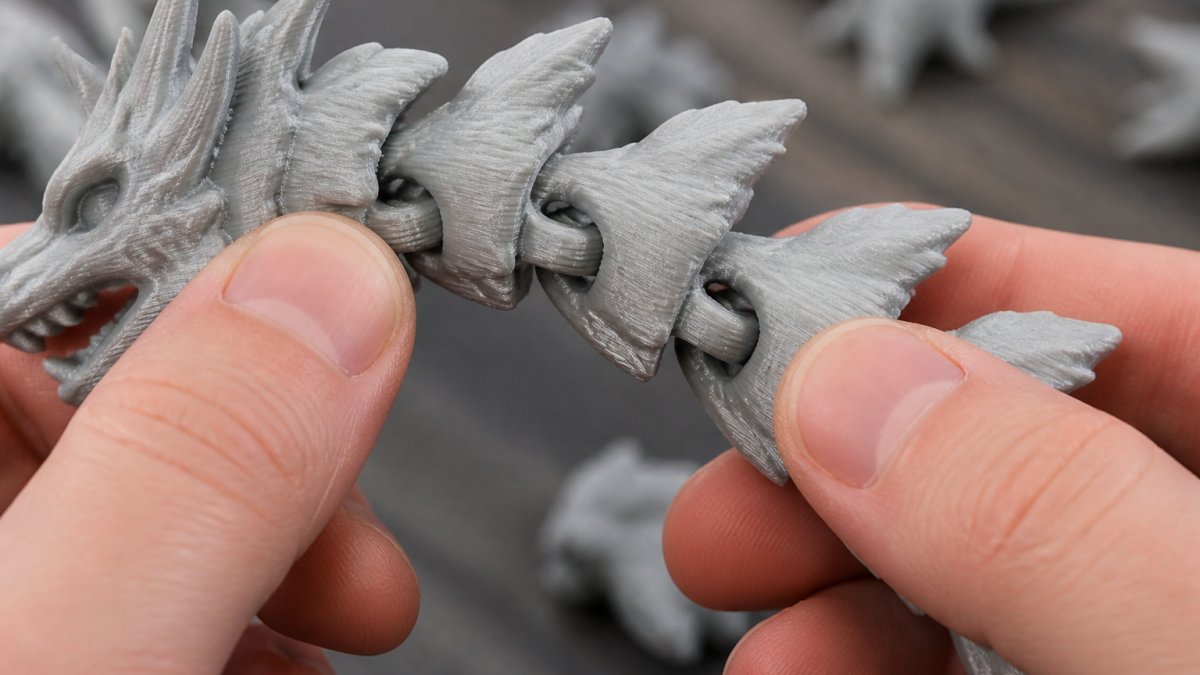
Articulated joints break easily because 3D printing creates weak points traditional manufacturing doesn't. The layer-by-layer process leaves tiny gaps between segments that become stress points when you bend or pose your figure.
The good news? Most joint failures are preventable. Understanding why articulated joints break is the first step to owning figures that last years, not weeks.
Layer Adhesion and Print Temperature
Poor layer bonding is the number-one cause of joint failure in 3D-printed toys.
A nozzle even 10 degrees too cold causes filament to sit on top of previous layers instead of bonding, creating a natural fracture line right where your articulated joint needs to flex.
The fix is simple: dial in the right temperature. PLA prints best between 200-210 degrees Celsius, PETG at 230-250 degrees.
Cooling speed matters too. Rapid cooling can cause stress between layers. A controlled cooling environment produces joints that bend without cracking.
Print Speed and Extrusion Quality
Fast printing kills joint quality. Rushing causes uneven deposition and under-extrusion, less plastic flows onto your model, and thinner walls mean weaker joints.
Slow down for articulated sections. Reduce speed by 20-30% when printing articulated toys, your print takes longer, but your joints stay intact.
Over-extrusion causes the opposite problem: too much filament squeezes out, creating rough, uneven layers that make the joint brittle instead of flexible.
Joint Clearance and Dimensional Tolerance
Tight tolerances kill articulated joints. If your pin and socket fit too snugly, friction builds up, the joint seizes, and forcing it to move breaks something.
Too much clearance creates a loose, floppy joint that wears out fast. The sweet spot is a 0.5-1mm gap between pin and socket, smooth movement without excessive play.
Dimensional accuracy depends on your printer's calibration. Check steps per millimeter and belt tension, small errors compound across a large figure.
How to Prevent 3D-Printed Joints from Breaking
Prevention beats repair every time, but "print slower and design better" is not a plan. What works is a repeatable protocol: diagnose the failure type, fix the root cause, and prove the fix with a test print before committing a full model.
Step 1: Match the Symptom to the Failure
Different failures have different causes. Treating them all the same is why so many makers keep reprinting the same broken joint.
- Brittle snap across the pin: The pin shears cleanly. Usually a pin that is too thin, a sharp root with no fillet, or a brittle material like standard PLA. Fix the geometry first, then consider a tougher filament.
- Layer split along the joint: The part separates between layers, leaving visible layer lines on the break. This is weak layer adhesion, driven by low print temperature, too much cooling, or printing too fast.
- Fused joint that will not move: The clearance closed up. Caused by too little gap, over-extrusion, or material shrinkage pulling the socket onto the pin.
- Loose, floppy joint: Too much clearance or a worn socket. The joint moves but has no grip and eventually snaps at the pin root from repeated slop.
Step 2: Fix the Root Cause
- For layer splits: Raise nozzle temperature toward the top of your filament's range, reduce part-cooling fan speed, and slow down. Better fusion between layers is the whole game.
- For brittle snaps: Thicken the pin, add a fillet at the root, and switch to a tougher material for parts that get flexed.
- For fused joints: Open the clearance slightly, check your flow rate for over-extrusion, and account for shrinkage.
- For loose joints: Tighten clearance and check that your printer is not under-extruding, which shrinks every dimension.
Step 3: Prove It With a Test Print
Before printing the full figure, print a small strength and tolerance coupon: a short pin, a socket, and a thin flexing tab. Bend the tab until it fails and note where it breaks, then flex the pin in the socket and feel for binding or slop. If the coupon survives, the full model will too, if it fails, you've lost minutes instead of hours.
Design and Orientation Still Matter
Once the process is dialed in, two design choices lock in durability:
- Orient the pin parallel to the build plate. A pin printed along the Z-axis is stacked across its weakest direction and snaps far more easily than one printed with its length lying flat, where stress runs along the layer lines instead of across them.
- Design for the forces the joint will see. A fidget toy that gets flexed hundreds of times needs a thicker pin and a deeper socket than a display piece that is posed once. Match the joint to its job.
This is exactly the discipline behind every figure we sell. Each piece is printed to order with temperature, speed, orientation, and clearance tuned for its material, so the joints move smoothly and hold up to real handling, turning a print into a collectible you can actually enjoy.
Best Filament for Articulated Toys
Not all filaments are equal for articulated joints. Standard PLA is brittle. It snaps under stress. PETG is more flexible and durable.
For display pieces and collectibles, we recommend PLA with a silk finish. The Nebula Crystal Dragon at Snaply3D uses premium silk PLA for this reason.

For fidget toys and pieces that get flexed repeatedly, PETG is the better choice. It absorbs stress better than PLA.
TPU is the most flexible option but harder to print, requiring slower speeds and careful temperature control.
Nebula Crystal Dragon – 18-Inch Articulated 3D Printed Collectible →
Cheap filament often has inconsistent diameter, and thinner filament means under-extrusion and weak joints.
3D-Printed Joint Design and Tolerances
Successful articulated joint design starts with clearance. A pin-and-socket joint needs space to move without binding, but the right number shifts with your material, nozzle, printer calibration, and joint geometry. Getting this wrong is the single most common reason a print-in-place figure either fuses solid or flops apart.
Start With a Baseline, Then Adjust
A practical starting point for a print-in-place pin-and-socket is a radial gap of about 0.2-0.3mm per side, roughly 0.4-0.6mm total diametral clearance. That's tighter than the 0.5-1mm many guides repeat, and deliberately so: too much clearance creates a loose, wobbly joint that wears and snaps at the pin root, while too little fuses the parts together.
From that baseline, adjust in these directions:
- Nozzle size: A 0.4mm nozzle lays down a bead around 0.4-0.45mm wide. Clearances smaller than roughly half your nozzle diameter tend to bridge or weld shut. If you print with a 0.6mm nozzle, open your clearance to about 0.3-0.4mm per side.
- Material shrinkage: PLA shrinks roughly 0.3%, PETG closer to 0.5%, and ABS can shrink noticeably more. A joint designed at 0.2mm per side for PLA may come out too tight in PETG because the socket contracts around the pin as it cools. Add a little extra clearance for higher-shrink materials.
- Joint geometry: A long pin in a deep socket needs more clearance than a short stub, because small angular misalignments compound over length. Ball-and-socket joints need clearance in every direction, while a simple hinge only needs it on the bearing surfaces.
- Printer calibration: Steps-per-millimeter, belt tension, and flow rate all shift your real-world dimensions. A printer that over-extrudes by 5% can close a 0.2mm gap entirely.
Why Wall Thickness and Pin Diameter Decide Whether It Survives
Clearance only buys you movement. Strength comes from the material around the joint.
- Socket wall: Aim for at least 2-3mm of material around the socket (Effect of wall thickness of 3D‐printed models on resisting deformation from thermal...). Thin walls look elegant but crack under the hoop stress of a flexing pin.
- Pin diameter: A pin of 4-5mm is dramatically stronger than one of 2-3mm, because bending stress scales with the cube of the diameter. Doubling pin thickness can make it roughly eight times more resistant to snapping.
- Fillet the roots: Sharp inside corners concentrate stress. A small fillet where the pin meets its base spreads the load and is one of the cheapest durability upgrades you can design in.
Test Before You Commit
Never send a full articulated model to print on untested tolerances. Print a small coupon first: a short pin and socket at your intended clearance, plus one step tighter and one step looser. Flex each one. The tightest pair that still moves freely is your real-world clearance for that material and printer. This five-minute test saves hours of failed prints and is the difference between a figure that poses smoothly for years and one that snaps on the first bend.
Every articulated piece in our collection is engineered around these tolerances and printed to order, so the joints move the way they should from the first flex.
Fixing a Broken 3D-Printed Joint
If your articulated joint breaks, you have options.
Cyanoacrylate glue (super glue) works for small, clean breaks: clean the surfaces, apply glue, and clamp while it dries.
Epoxy is stronger than cyanoacrylate for 3D-printed plastic, creating a bond almost as strong as the original print.
Prevention is always better than repair. Our Articulated Snake and other flex toys are designed with smooth flexible joints.

Why Premium 3D-Printed Figures Hold Up Better
Premium figures are printed with better equipment, materials, and process control, every step of production affects joint durability.
Quality control matters. Premium makers inspect every articulated figure to make sure they move smoothly before shipping.
Material choice is critical. Premium silk PLA looks better and prints more consistently than budget filament, with a smoother finish.
Printer calibration makes a huge difference.
Print temperature control is tighter on quality machines, producing consistent layer adhesion and stronger joints.
The Transforming Sphere Fidget Toy from Snaply3D demonstrates this.
Articulated joints break because of weak layer adhesion, poor extrusion, and design flaws. Explore our collection of articulated dragons, fidget toys, and articulated dinosaur skeletons, each printed to order with the quality control that ensures your joints stay strong.

Frequently Asked Questions
Why do articulated 3D-printed joints break so easily?
Articulated joints break due to weak layer adhesion between printed layers, improper print temperature causing poor bonding, and insufficient clearance tolerance that creates stress concentration points. If joints are printed too fast or with under-extrusion, the filament doesn't fuse properly between layers, especially along the Z-axis where strength is weakest. Premium 3D-printed figures like Snaply3D's articulated dragons use optimized nozzle temperatures and slower print speeds to ensure each layer bonds completely, creating joints that flex without snapping.
How can I prevent 3D-printed joints from breaking?
Prevent joint failure by choosing figures printed with high-quality filament and proper cooling rates. Avoid rapid, forceful movement of joints, especially when first handling a new figure. The best filament for articulated toys is premium PLA with consistent extrusion quality, printed at the correct temperature to maximize layer adhesion. When handling articulated figures, flex joints slowly and deliberately rather than snapping them back and forth. Snaply3D's premium silk PLA finish on articulated dragons ensures smooth joint movement.
What filament works best for articulated toys that won't snap?
Premium PLA filament is the best choice for articulated toys because it offers a balance of flexibility and durability when printed correctly. High-quality PLA maintains consistent extrusion, which means better layer bonding and fewer weak points. The material's natural properties allow joints to bend without becoming brittle, unlike lower-grade filament that can crack under stress. Snaply3D uses premium silk PLA for its articulated collectibles, which provides the smooth finish collectors expect. Avoid cheap filament that shows inconsistent extrusion or produces brittle joints that snap after minimal handling.
Can a broken 3D-printed joint be repaired or replaced?
Minor joint damage can sometimes be repaired with CA adhesive (cyanoacrylate), though the joint will be less flexible afterward. For articulated figures, if a joint breaks completely, replacement is often the better solution since the stress concentration at the fracture point will make it prone to breaking again. If you purchase from Snaply3D, our commitment to quality means you're investing in figures designed for display. Premium articulated figures like our crystal dragons and flexible snakes are built with joint geometry that resists fracture.