

How to Tell Quality 3D Prints: A Buyer's Guide
Table of Contents
- What Makes a 3D Print High Quality
- Creating a 3D Print Quality Checklist for Inspection
- How to Inspect a 3D-Printed Figure for Defects
- Evaluating 3D Print Surface Finish Quality
- Testing Articulated 3D-Printed Toys for Durability
- Resolution, Detail, and Benchmark Tests
- Why Premium 3D Prints Justify the Investment
- Frequently Asked Questions
Last Updated: October 7, 2026
What Makes a 3D Print High Quality
High-quality 3D prints combine three essential elements: precision, durability, and visual appeal.
The difference starts with dimensional accuracy. A quality 3D print holds its specified tolerances within a tight range. This matters most for articulated designs where joints need to fit snugly without binding. Poor dimensional control means loose joints that fail after minimal handling, or tight joints that won't move at all.
Surface finish quality tells another story. Premium 3D prints show even layer lines that are barely visible, or none at all depending on print settings. Budget prints often display obvious banding, rough patches, or inconsistent texture across the same surface.
But here's what most buyers miss: cosmetic quality and functional quality are not the same thing. A figure might look flawless under casual inspection yet fail stress tests. Conversely, a print with minor cosmetic imperfections can perform beautifully for years. Understanding this distinction helps you evaluate whether a piece justifies its price.
The best way to assess quality 3D prints is through a systematic inspection process, so you know what you're paying for.
Creating a 3D Print Quality Checklist for Inspection
A proper inspection checklist ensures you evaluate every critical dimension of a 3D print before committing to a purchase. This approach separates casual buyers from informed collectors who know exactly what to look for.
Visual Inspection Steps
Step 1: Examine the overall surface finish. Look for visible layer lines running horizontally across the print. High-quality prints show minimal banding. Run your fingertip gently across the surface, premium pieces feel smooth, not rough or grainy.
Step 2: Check for print artifacts. Look for stringing (thin plastic strands between parts), blobs, or rough spots. Quality 3D prints should have clean edges and smooth transitions between surfaces.
Step 3: Inspect corners and details. Zoom in on small features like fingers, edges, or fine details. Sharp, well-defined details indicate proper printer calibration and good slicer settings.
Step 4: Assess color consistency. If the print uses multiple colors or a single color, it should be uniform throughout. Discoloration or streaking suggests filament quality issues or moisture problems.
Step 5: Look for layer adhesion problems. Delamination appears as visible separation between layers. This is a red flag for durability issues.
Dimensional and Tolerance Checks
Dimensional accuracy is where premium 3D prints prove their worth. This is especially critical for articulated figures where joints must fit precisely.
Use a digital caliper to measure key dimensions against the design specifications. Check the diameter of articulation joints, the thickness of walls, and the overall size of the piece.
For articulated designs, test joint fit without forcing anything. Joints should move smoothly with light resistance, not loose enough to fall apart, not so tight they won't articulate at all. This balance requires tight tolerance control during printing.
Compare your measurements to the design file or product specifications. Quality 3D prints typically maintain tolerances within ±0.2mm for critical dimensions. Budget prints often drift outside acceptable ranges.
Document your findings in a simple table:
| Dimension | Specification | Measured | Pass/Fail |
|---|---|---|---|
| Joint diameter | 8.0mm | 7.95mm | Pass |
| Wall thickness | 2.0mm | 1.95mm | Pass |
| Overall height | 150mm | 149.8mm | Pass |
How to Inspect a 3D-Printed Figure for Defects
Defect inspection separates quality prints from problematic ones. This is where Snaply3D's commitment to precision really matters.
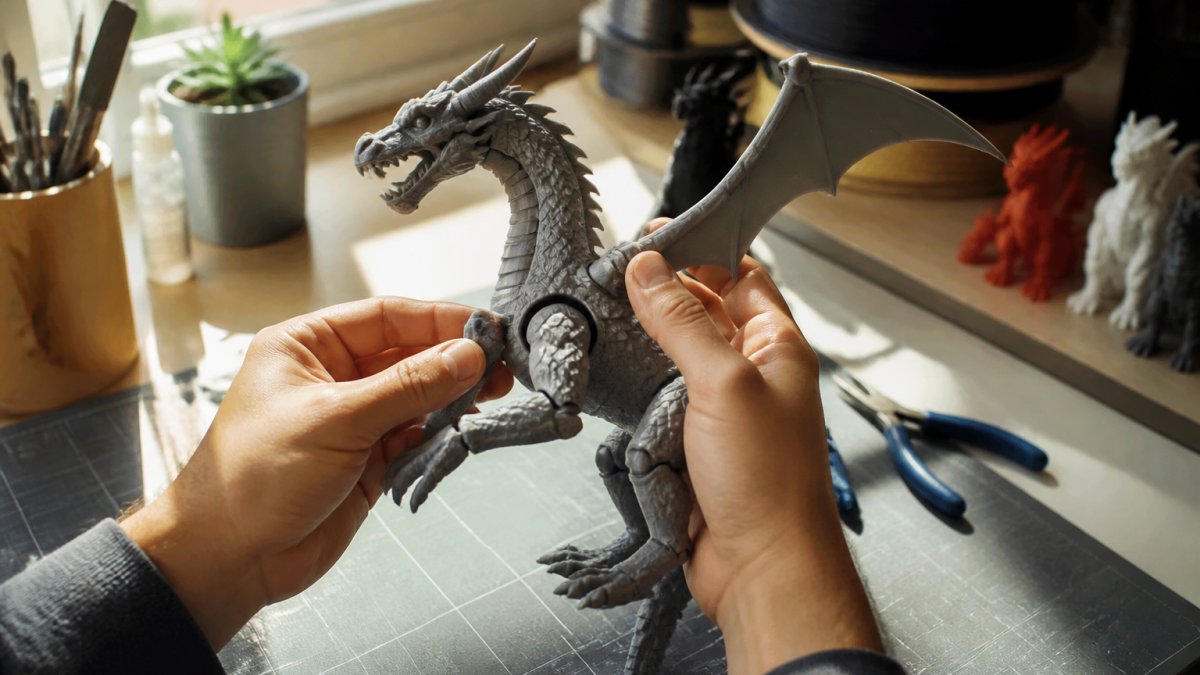
Common Print Defects and What They Mean
Stringing appears as thin plastic threads connecting separate parts. It indicates incomplete nozzle retraction during travel moves. Minor stringing is cosmetic; heavy stringing suggests poor print settings or low-quality filament.
Layer misalignment shows as visible steps or offsets between layers. This points to mechanical issues with the printer or unstable print bed. It's a sign of poor dimensional accuracy.
Warping occurs when corners or edges curl upward. This happens when prints cool unevenly or when the print bed isn't level. Warped prints look poor and often fail functional tests.
Infill gaps appear as hollow spots or soft areas when you press on the print. These indicate incomplete infill or insufficient infill density. They compromise both durability and structural integrity.
Rough or grainy surfaces suggest moisture in the filament or incorrect nozzle temperature. This is common with lower-quality materials. Premium 3D prints use properly dried filament for smooth, consistent finish.
Strength and Layer Adhesion Testing
Layer adhesion determines whether a print will last or fail within weeks. Test this by attempting to peel or separate layers at a seam. Quality prints resist this test completely.
For articulated figures, perform a gentle stress test. Flex joints slowly through their full range of motion 10-15 times. Listen for cracking sounds. Feel for any give or flexibility in the joint itself, the joint should move smoothly without the surrounding plastic flexing.
Bend a thin section of the print gently. It should flex slightly and return to shape, not snap or crease permanently. Permanent creasing indicates weak layer adhesion or brittle material.
Press firmly on the thickest section with your thumb. Quality prints feel solid and rigid. Soft or spongy areas indicate infill problems.
Evaluating 3D Print Surface Finish Quality
Surface finish quality directly impacts whether a piece looks premium or budget. This is where the visual appeal of your 3D printed collectible is decided.
What Layer Lines Tell You
Layer lines are the horizontal striations visible on printed surfaces. Their appearance reveals a lot about print quality and settings.
Visible, uniform layer lines indicate consistent printing. If lines are evenly spaced and parallel, the printer maintained stable settings throughout. This is actually a sign of good control, even if the surface isn't perfectly smooth.
Inconsistent layer lines, some prominent, others faint, suggest variable extrusion or temperature fluctuations. This indicates lower quality.
Very faint or nearly invisible layer lines mean the printer used optimal settings for surface finish. This requires either a finer layer height (which takes longer) or post-processing. Premium 3D prints often show minimal layer lines.
Cosmetic Quality Versus Functional Quality
Here's the critical distinction: a print can look beautiful but fail functionally, or look rough but perform flawlessly.
Cosmetic quality is what you see: smooth surfaces, no visible defects, fine detail clarity, consistent color. This matters for display pieces and collectibles.
Functional quality is what you feel: solid joints, strong layer adhesion, proper tolerances, durability under stress. This matters for fidget toys and articulated figures that get handled regularly.
Premium 3D prints excel at both. Budget prints often sacrifice one for the other. A collectible dragon from Snaply3D delivers cosmetic appeal AND structural integrity, joints stay tight, articulation remains smooth, and the piece maintains its integrity for years.
When evaluating a purchase, ask yourself which matters more for your use case. For display-only collectibles, cosmetic quality is paramount. For interactive toys, functional quality is non-negotiable.
Testing Articulated 3D-Printed Toys for Durability
Articulated figures demand rigorous durability testing. This is where you separate toys that break after a few weeks from pieces that last for years.
Joint Tightness and Range of Motion
Test each joint individually. Move it through its full range of motion slowly. It should move smoothly with consistent resistance, not loose, not grinding.
Measure the tightness by the force required to move the joint. A properly designed articulated figure requires light finger pressure to articulate. If you need to grip hard or use tools, the joint is too tight. If joints fall loose or flop around, they're too loose.
Check tightness consistency across all joints. If some joints are loose and others tight, this indicates poor quality control during printing or assembly.
Perform this test multiple times over several minutes. Joints shouldn't loosen up as you manipulate them. Quality 3D prints maintain consistent tightness indefinitely.
Long-Term Wear and Material Fatigue
Premium articulated figures from Snaply3D are optimized for durability, not just appearance.
Resolution, Detail, and Benchmark Tests
Precision printing reveals itself through fine detail reproduction. This is where you evaluate whether a 3D printer's capabilities match its specifications.
Using Calibration Prints to Evaluate Precision
A calibration cube is the standard benchmark test. This simple cube reveals dimensional accuracy, surface finish consistency, and print quality in one object.
Measure all dimensions of a calibration cube. Quality prints maintain dimensional accuracy within ±0.2mm across all measurements. If measurements vary widely, calibration is poor.
Examine surface finish on all six sides. They should look identical. If some sides are smooth and others rough, the print bed wasn't level or the nozzle height varied.
Check for warping by placing the cube on a flat surface. It should sit flat without rocking. Warped cubes indicate cooling issues or bed adhesion problems.
Look at the top surface closely. Small features or text should be crisp and clear. Blurry or poorly defined details indicate resolution limitations or focus issues.
Overhang and Bridging Performance
Overhangs are surfaces printed at angles greater than 45 degrees without support. Quality printers handle overhangs cleanly. Budget printers produce rough, stringy results.
Examine overhang surfaces on the print. They should be smooth and well-defined. Rough, bumpy overhangs indicate poor print settings or inadequate cooling.
Bridging is printing across gaps without support. Quality prints bridge cleanly with minimal sagging. Poor bridging appears as wavy or drooping surfaces.
Test bridging by examining horizontal surfaces that span open areas. They should be flat and smooth. Sagging or wavy surfaces indicate inadequate extrusion control during bridging moves.
These tests reveal whether a 3D printer is truly capable of precision work or if it cuts corners on difficult geometry.
Why Premium 3D Prints Justify the Investment
Premium 3D prints cost more because they deliver measurable value that budget alternatives cannot match. Understanding this difference helps you make confident purchasing decisions.
Quality 3D prints maintain their appearance and functionality indefinitely. Budget prints show wear, degradation, and cosmetic damage within weeks. When you calculate cost per year of enjoyment, premium pieces offer superior value.
Articulated figures from Snaply3D stay tight and articulate smoothly for years. The materials resist fatigue, joints remain functional, and the piece maintains its collectible appeal.
Fine detail reproduction sets premium prints apart. Delicate features, crisp edges, and intricate surfaces showcase superior printing technology and careful calibration. These details create the visual impact that makes a collectible genuinely collectible.
Material quality matters more than most buyers realize. Premium 3D prints use high-quality filament that's properly dried and stored. This eliminates brittleness, discoloration, and premature failure. Budget materials often contain moisture or contaminants that compromise durability.
The real question isn't whether premium 3D prints cost more, they do. The question is whether they deliver enough extra value to justify the investment.
Evaluating 3D print quality transforms you from a casual buyer into an informed collector.
When you're ready to invest in quality 3D printed collectibles, Snaply3D delivers on every dimension this guide covers. Our articulated dragons feature precision-engineered joints that stay tight, premium materials that resist fatigue, and fine detail work that showcases superior printing technology.
Frequently Asked Questions
What should you look for in a high-quality 3D print?
High-quality 3D prints show consistent layer lines, smooth surfaces, accurate dimensions within tolerance, and sturdy joints. Check for visible stringing, layer separation, or rough spots. For articulated figures, test joint tightness and range of motion. Examine fine details, sharp edges and crisp features indicate precise calibration. Run your finger over the surface; premium prints feel even without major ridges or gaps between layers.
How can you tell if a 3D-printed figure is sturdy and won't break?
Inspect layer adhesion by attempting gentle flexing at joints and stress points, quality prints resist delamination. Check for consistent wall thickness and no visible cracks or voids. Articulated parts should move smoothly without wobbling or feeling fragile.
What do layer lines on a 3D print indicate about quality?
Layer lines show the resolution and calibration of the print. Fine, evenly-spaced lines indicate precise layer height settings and proper nozzle alignment. Uneven, wavy, or inconsistent lines suggest calibration issues or filament problems. Some layer visibility is normal, but premium prints minimize this through finer layer heights and post-processing. Visible ridges or gaps between layers signal poor adhesion or moisture-damaged filament, both red flags for durability.
How do you evaluate an articulated 3D-printed toy before buying?
Test joint movement: quality articulated toys rotate smoothly through their full range without resistance or play. Examine connection points for cracks or weak spots. Verify all moving parts are properly supported and not prone to snapping.